WhatsApp campaigns
A campaign sends one approved template to many people at once, like a festival offer to everyone tagged vip. You see exactly who gets it, who is left out and roughly what Meta will charge before anything goes out.
Open Campaigns in the WhatsApp menu. The list shows each campaign's status, how many people it went to, and how many got it, read it and clicked its link. Filter by Running, Scheduled, Drafts or Done.
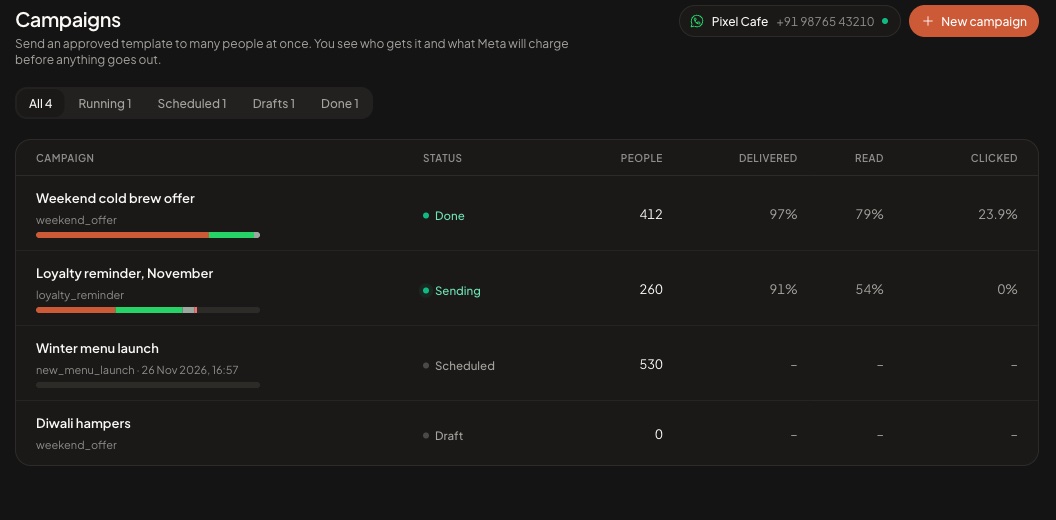
Press New campaign to start. It takes three steps.
Step 1: Message
-
Campaign name. Only you see it.
-
Template. Choose an approved template. The preview shows what people will see.
-
Fill in the template. For each value in the template, like
{{1}}, choose where it comes from:- Contact's first name, full name or phone
- A contact field, like
city - The same text for everyone
For names and fields, set If missing, use (for example
there, soHi {{1}}becomesHi there). Without it, people missing that value are left out.
If the template has a link button ending in {{1}}, you can choose Click tracking code. Each person then gets their own link, so the campaign can count who clicked. The link must be an AutoDM short link ending in ?adr={{1}}.
Step 2: Who gets it
- Everyone eligible: every contact who agreed to marketing.
- People with tags: contacts with any or all of the tags you pick.
- A saved segment (Business Max): a group you saved on the Segments page.
Only people who agreed to marketing and have not opted out get a campaign, whatever you pick here.
More people than your daily limit
Meta limits how many different people your number can start chats with in 24 hours (see New chats per day on your number's health). If the audience is bigger, choose:
- Send the rest the next day: the rest go out over the following days, or
- Leave the rest out.
Step 3: Check and send
Before anything is sent, AutoDM shows:
- Gets it: how many people will get the message.
- Left out, and why:
- no marketing consent recorded,
- opted out,
- duplicates or a missing value,
- over the daily limit.
- Estimated cost: roughly what Meta will bill you, in your WhatsApp account's currency, using Meta's current prices for each person's country. Volume discounts and free messages are not included, so the real bill is usually the same or lower.
- What they will see: the message as it will look.
Use Send a test to your own number to see it on your phone first.
Then:
- Send now starts sending straight away.
- Schedule (Business Max) sends at a date and time you choose.
- Repeat (Business Max): Every day, Every week or Every month. Each run picks its people again when it starts, so new contacts with the tag are included.
- Save draft keeps it to finish later.
If something stops the campaign from going out, AutoDM shows This cannot be sent yet with the reason:
| Reason | What to do |
|---|---|
| The number is not connected | Connect it again on the WhatsApp page |
| The template is not approved | Wait for approval, or pick another template |
| No payment method | Add one in WhatsApp Manager billing |
| The number's quality is low | Wait for it to recover and send marketing only to people who asked for it |
| Nobody can receive it | Check the audience and that people agreed to marketing |
While it sends
The campaign page shows progress and each person's status:
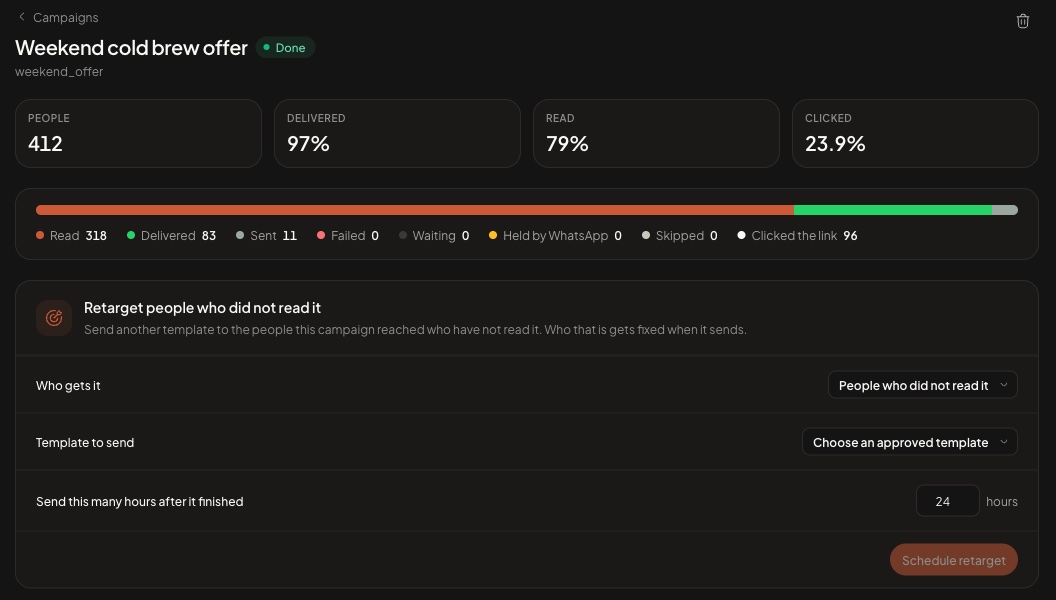
| Status | What it means |
|---|---|
| Waiting | Not sent yet |
| Sent | WhatsApp accepted it |
| Delivered | It reached their phone |
| Read | They opened it (only if they have read receipts on) |
| Failed | It could not be sent. The reason is shown. |
| Held by WhatsApp | WhatsApp held this marketing message to protect the person from too many offers. It is not retried. |
| Skipped | Not sent because the campaign was cancelled first |
- Pause stops sending, and Resume carries on where it stopped.
- Cancel campaign stops it for good. People who have not been sent it yet will not get it.
- If the connection to WhatsApp breaks while a message is being sent, AutoDM cannot know whether it went out, so it marks it Failed and does not send it again. Nobody gets the same campaign twice.
- AutoDM pauses a campaign by itself when the problem is with the template, the payment method or the number rather than with one person, and shows why. Fix it and press Resume.
Retarget people who did not read it
Business Max. After a campaign finishes, you can send a second template to the people it reached who did not read it (or did not click the link, with click tracking). Choose the template and how many hours after the campaign to send it. Who gets it is decided when it sends.
Replies to a campaign
When someone replies, the chat appears in the Inbox and their 24-hour window opens, so you or your automations can answer with any message. If the template has quick reply buttons, an automation with the Button reply trigger can answer each button.
Good practice
- Send marketing only to people who asked for it. If many people block or report you, Meta lowers your quality and limits your number.
- Use Utility templates only for real updates, like orders. They cost much less, but WhatsApp moves misused ones to Marketing.
- Start small. Your daily limit grows as people respond well to your messages.